Audit Log
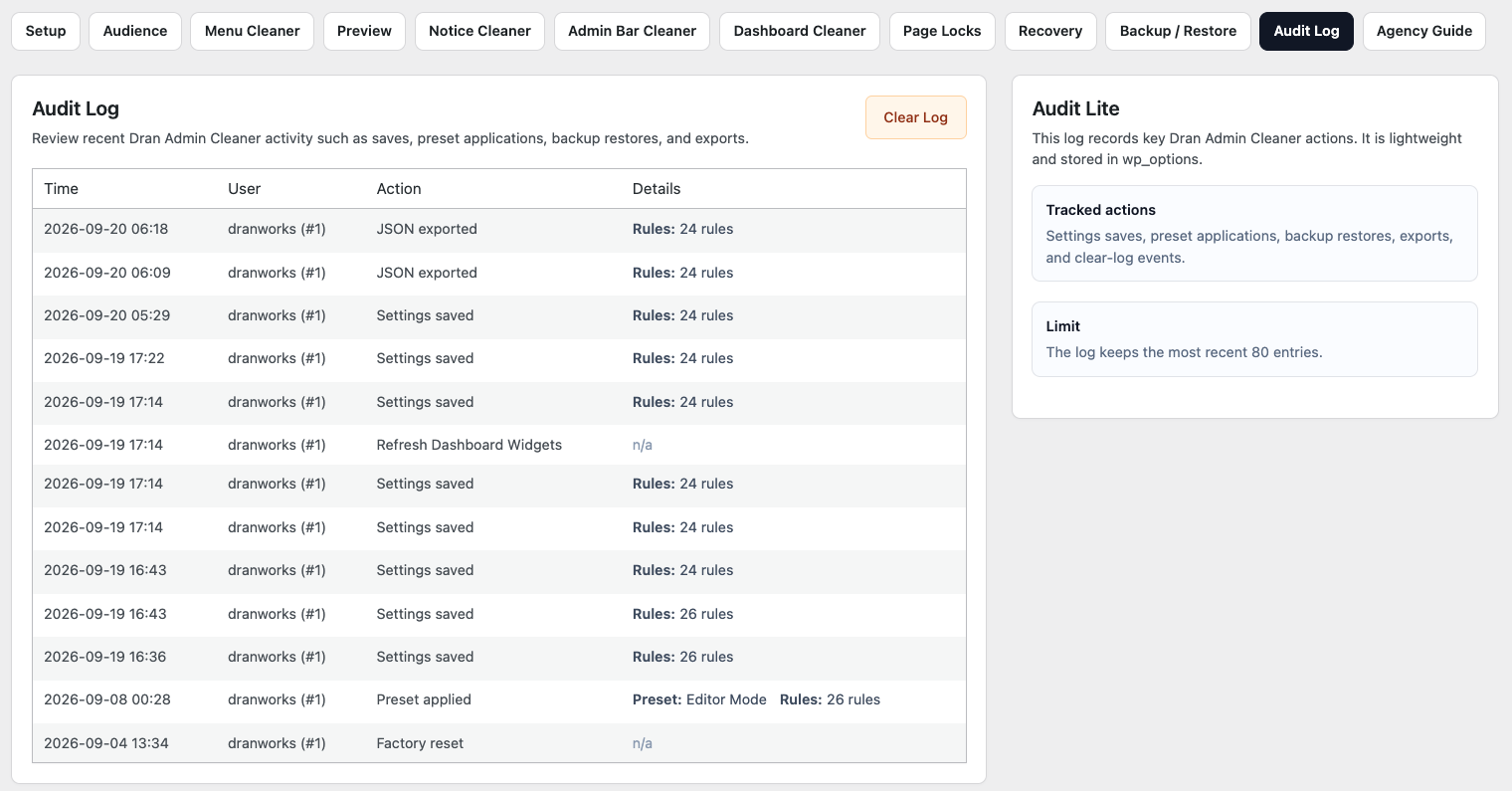
Audit Log helps you review important configuration activity in Dran Admin Cleaner (DAC).
When multiple trusted administrators maintain a website, it can be useful to understand when DAC settings were changed and who performed those actions.
Audit Log records supported DAC activity, providing useful context when reviewing recent changes or troubleshooting unexpected behavior.
What Audit Log Records
Audit Log focuses on activity related to Dran Admin Cleaner.
Depending on the action and DAC version, a log entry may include information such as:
- The action that occurred.
- The WordPress user who performed it.
- The affected DAC feature or configuration area.
- The date and time of the activity.
- Additional details related to the action where available.
The exact information depends on the type of event being recorded.
Audit Log is intended to provide useful administrative context rather than a complete copy of every configuration change.
Why Audit Log Is Useful
DAC can change several parts of the WordPress admin experience.
When something behaves differently than expected, Audit Log can help answer questions such as:
- Was DAC recently reconfigured?
- Who made the change?
- Which DAC feature was involved?
- When did the action occur?
- Was a restore, import, reset, or other significant operation performed?
This is especially useful on websites maintained by more than one trusted administrator.
Example: An Unexpected Menu Change
Suppose a client reports that a menu item they normally use has disappeared.
Before rebuilding the configuration, check Audit Log.
You may find an entry showing activity related to Menu Cleaner, for example:
User: Agency Manager
Action: Configuration updated
Feature: Menu Cleaner
Time: September 20, 2026 10:32
This gives you a useful starting point.
You can then review the current Menu Cleaner configuration and determine whether the change was intentional.
Working With Multiple Managers
Audit Log becomes especially useful when several trusted users can manage DAC.
For example, a website may have:
Owner → Lead Developer
Manager → Project Developer
Manager → Support Administrator
Without an activity record, it may be difficult to understand why a configuration changed.
Audit Log provides shared context about supported DAC activity without requiring administrators to manually document every small adjustment.
Configuration Changes
When supported DAC settings are changed, Audit Log may record activity related to areas such as:
- Global Audience.
- Menu Cleaner.
- Page Locks.
- Notice Cleaner.
- Dashboard Cleaner.
- Admin Bar Cleaner.
- Owner and Manager settings.
- Other supported DAC configuration.
The purpose of the log is to show what happened, not to duplicate the complete configuration before and after every change.
Important Administrative Actions
Some DAC operations can affect a significant part of the configuration at once.
Where supported, Audit Log may record actions such as:
- Configuration updates.
- Backup or restore operations.
- Imports.
- Resets.
- Factory Reset.
- Other administrative actions recorded by DAC.
These entries can be especially useful when a website's admin experience changes substantially after a single operation.
Audit Log and Troubleshooting
When DAC behaves differently than expected, Audit Log is a useful place to check before making additional changes.
A practical troubleshooting flow is:
Unexpected DAC behavior → Check Audit Log → Identify recent relevant activity → Review the affected configuration → Correct the problem → Preview or test the result
This can prevent unnecessary changes when the cause is already visible in recent activity.
Audit Log Is Not Configuration History
Audit Log records supported actions, but it is not a complete version history of your DAC configuration.
A log entry may tell you that Menu Cleaner was changed without containing a complete copy of the previous Menu Cleaner configuration.
If you need a known configuration that can be restored later, use Backup & Restore.
A simple distinction is:
Audit Log → What happened?
Backup & Restore → How can I return to a previous configuration?
Audit Log helps you investigate.
Backup & Restore gives you a rollback point.
Audit Log Is Not a WordPress Security Log
DAC Audit Log focuses on supported Dran Admin Cleaner activity.
It is not intended to record every action performed throughout WordPress.
For example, it should not be treated as a complete history of:
- WordPress logins.
- Post or page edits.
- Media changes.
- Plugin installations.
- Theme changes.
- General user activity.
- Server activity.
- Security events outside DAC.
If a website requires comprehensive activity or security monitoring, use a dedicated WordPress activity or security logging solution.
Audit Log Does Not Replace Backups
Audit Log can help identify when something changed, but it cannot restore the previous state by itself.
Before significant DAC changes, create a backup of the working configuration.
If a problem occurs later:
- Review Audit Log to understand what changed.
- Review the affected DAC configuration.
- Correct the setting manually when appropriate.
- Restore a known working backup when rollback is safer or faster.
Audit Log and Backup & Restore complement each other: one provides context, the other provides recovery.
Reviewing the Audit Log
You do not need to monitor Audit Log constantly.
It is most useful when:
- Something changed unexpectedly.
- A client reports a different admin experience.
- Multiple Managers maintain DAC.
- You are troubleshooting an access problem.
- You want to review recent DAC administration activity.
- A significant configuration operation was recently performed.
For normal day-to-day use, Audit Log can simply remain available until you need to investigate something.
Privacy Considerations
Audit Log may contain information about WordPress users who perform DAC administrative actions.
Access should therefore be limited to trusted users responsible for maintaining DAC or the website.
Do not expose Audit Log information publicly or provide access to users who do not need administrative visibility.
Example: Troubleshooting a Page Lock
Suppose a client can no longer access a page they previously used.
A useful troubleshooting process is:
Client reports an access problem → Review Audit Log → Find a recent Page Locks change → Open Page Locks → Review the affected rule → Check its roles, users, and other conditions → Correct the rule → Test with an appropriate WordPress account
Because manual Page Locks use their own targeting conditions, review the Page Lock itself rather than relying on Global Audience.
If DAC restrictions prevent normal administrative access, use Recovery URL or Safe Mode as appropriate.
Recommended Approach
Use Audit Log as a diagnostic and accountability tool for DAC configuration.
When investigating an issue:
- Check recent Audit Log entries.
- Identify activity related to the affected feature.
- Review the current configuration.
- For shared cleanup features, verify Global Audience where relevant.
- For Page Locks, review the rule's own conditions.
- Correct the configuration if necessary.
- Preview affected roles where appropriate.
- Test important workflows with an actual WordPress account.
- Restore a backup when returning to a known configuration is safer than rebuilding manually.
For websites maintained by multiple people, Audit Log provides useful context without introducing a complicated administrative workflow.
Limitations
Audit Log records supported DAC activity only.
It does not guarantee a complete forensic history of WordPress or server activity and should not be treated as a replacement for:
- WordPress security monitoring.
- Server logs.
- Comprehensive activity logging.
- Website backups.
- DAC configuration backups.
Its purpose is simple: to help administrators understand important activity related to Dran Admin Cleaner.
Next Step
Continue with Agency Handoff Guide to learn how to prepare, test, and hand over a simplified WordPress admin experience to a client.