
Backup & Restore
Backup & Restore lets you save a copy of your Dran Admin Cleaner (DAC) cleanup configuration as a JSON file and restore it later when necessary.
DAC does not maintain an internal backup history.
To create a backup, export the current configuration and store the JSON file somewhere safe. To restore a previous configuration, upload a previously exported DAC JSON file.
This is useful before significant configuration changes, Page Lock updates, client handoff, Reset, or Factory Reset.
How Backup & Restore Works
The workflow is intentionally simple:
Current DAC configuration → Export JSON → Store the file safely → Make changes → Upload the JSON file when restoration is needed
DAC does not store multiple backup versions inside WordPress.
The exported JSON file is the backup.
You are responsible for storing and organizing exported files outside DAC.
What a Backup Contains
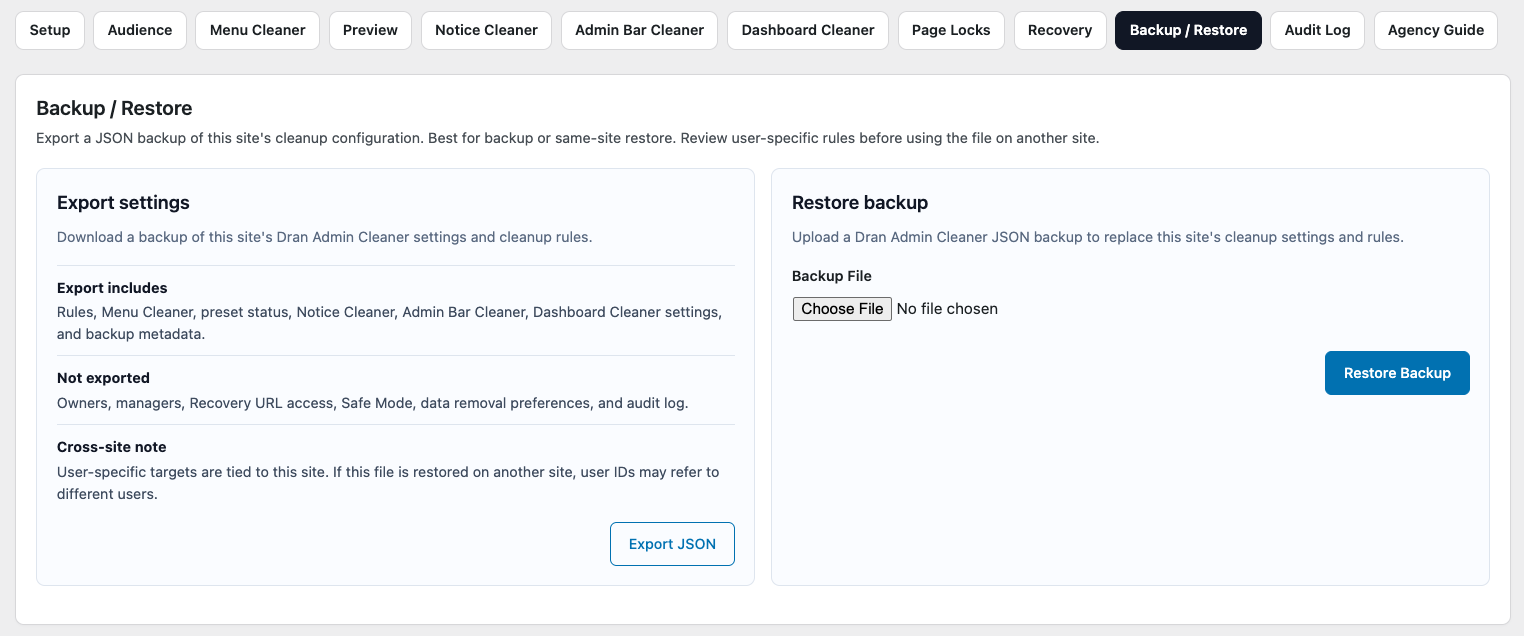
A DAC export contains supported cleanup settings and rules from the current configuration.
Depending on the DAC version and enabled features, this may include configuration related to:
- Global Audience.
- Menu Cleaner.
- Page Locks.
- Notice Cleaner.
- Dashboard Cleaner.
- Admin Bar Cleaner.
- Other supported cleanup settings and rules.
The export is intended to preserve the DAC cleanup configuration so it can be restored later.
It should not be treated as a complete copy of every DAC or WordPress setting.
A DAC Backup Is Not a Website Backup
A DAC backup contains supported Dran Admin Cleaner configuration only.
It does not back up the complete WordPress website.
It does not replace backups of:
- The WordPress database.
- Website files.
- Posts and pages.
- Media uploads.
- Themes.
- Plugins.
- Server configuration.
Use DAC Export & Restore for DAC cleanup configuration. Use your normal backup solution for the WordPress website itself.
For production websites, both may be useful before significant changes.
Create a Backup
To create a DAC backup, export the current configuration as a JSON file.
Useful times to export a backup include:
- Before significant Global Audience changes.
- Before adding or changing several Page Locks.
- Before restructuring Menu Cleaner.
- Before a major client handoff.
- Before Reset or Factory Reset.
- Before testing a substantially different cleanup configuration.
Store the exported file somewhere you can retrieve later.
The file represents the DAC cleanup configuration at the time it was exported.
Organize Exported Backup Files
Because DAC does not maintain an internal backup history, organize exported JSON files outside WordPress.
Using clear filenames can make older backups easier to identify.
For example:
dac-before-client-handoff.json
dac-before-page-lock-update.json
dac-stable-client-config.json
dac-before-factory-reset.json
You may also include a date when useful:
dac-2026-09-23-before-menu-change.json
Keep only the backups that have a meaningful purpose.
A folder full of indistinguishable JSON files is not much of a backup strategy.
Restore an Exported Configuration
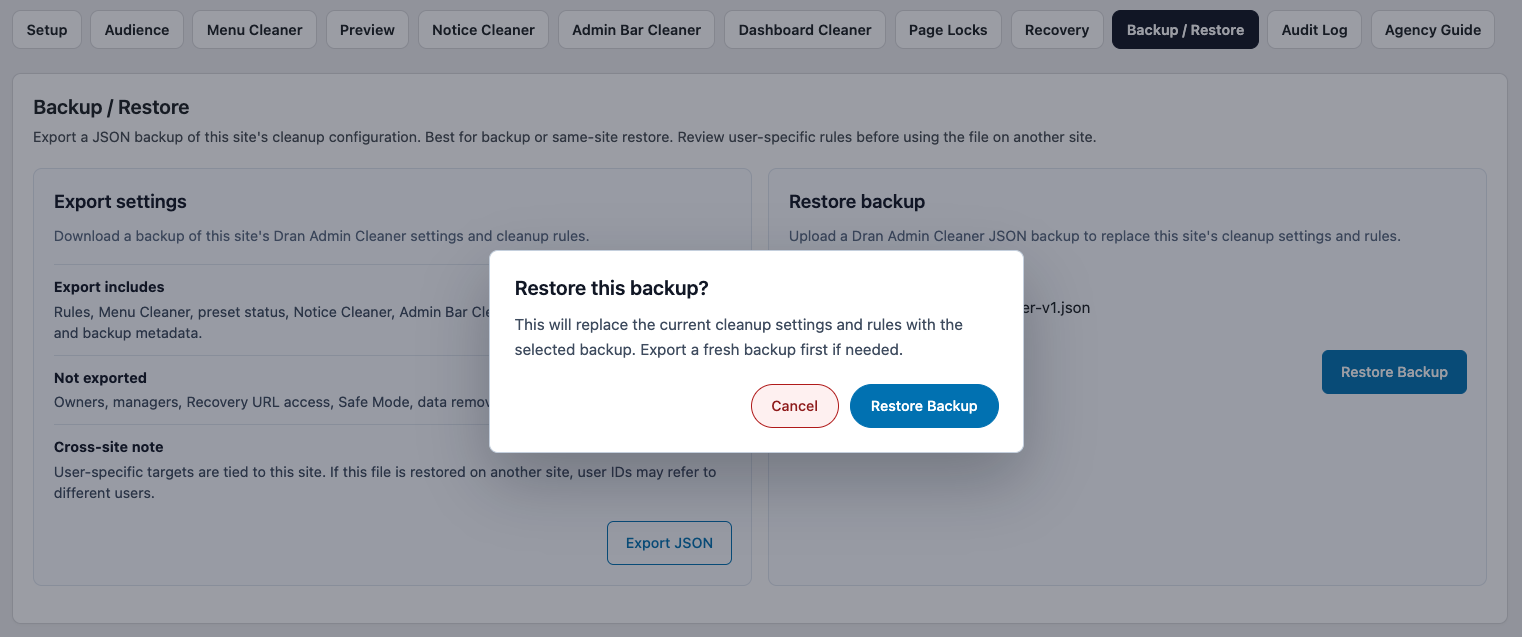
To restore an earlier DAC configuration, upload a previously exported DAC JSON file using the Restore interface.
Restoring replaces the current supported cleanup settings and rules with the configuration contained in the uploaded file.
This is not a merge operation.
Changes made after the export may be replaced when the older configuration is restored.
Review the file carefully before confirming the restore.
Before Restoring
A restore can replace several parts of the DAC cleanup configuration at once.
Before uploading an older export:
- Confirm that you selected the intended JSON file.
- Export the current configuration first if you may want to return to it.
- Make sure trusted administrative access is available.
- Keep your Recovery URL available.
- Consider how the WordPress environment has changed since the file was exported.
A safe workflow is:
Current configuration → Export current JSON → Restore older JSON → Review configuration → Test affected users and workflows
Exporting the current state first gives you a way to restore it again if the older configuration is no longer suitable.
Restore Replaces the Current Configuration
Restore should be treated as a replacement operation.
DAC loads the supported cleanup settings and rules from the uploaded file and replaces the corresponding current configuration.
Do not assume that Restore will preserve newer cleanup changes and combine them with the uploaded file.
If the current configuration contains changes you may need later, export it before restoring another file.
Review the Configuration After Restore
Do not assume that an older exported configuration is automatically correct for the website in its current state.
The WordPress environment may have changed since the JSON file was created.
For example, you may have:
- Installed or removed plugins.
- Changed themes.
- Added or removed users.
- Changed WordPress roles.
- Added new admin pages.
- Updated plugins that changed admin menus.
- Introduced new Dashboard widgets, notices, or Admin Bar items.
After restoring, review the DAC configuration against the current website.
Pay particular attention to:
- Global Audience.
- Menu Cleaner.
- Page Locks and their targeting conditions.
- Notice Cleaner.
- Dashboard Cleaner.
- Admin Bar Cleaner.
Then test important workflows using appropriate WordPress accounts.
Backups and Dynamic Admin Elements
Some DAC configuration refers to admin elements created by WordPress, themes, or plugins.
For example, an exported configuration may contain Menu Cleaner rules for a menu created by a plugin.
If that plugin is no longer installed when the configuration is restored, the corresponding menu item may no longer exist.
Likewise, plugins installed after the export was created may introduce new admin elements that are not represented in the restored configuration.
This does not necessarily mean the JSON file is invalid.
It means the current WordPress environment differs from the environment where the configuration was exported.
Review and update the restored configuration where necessary.
Backup Before Page Lock Changes
Page Locks can affect access to important WordPress admin pages.
Before making significant Page Lock changes, export the current DAC configuration.
A practical workflow is:
Known working configuration → Export JSON → Add or modify Page Locks → Test affected accounts → Test direct URLs → Keep the changes if everything works
If the Page Lock changes cause a problem, you can restore the exported configuration.
If DAC restrictions prevent normal administrative access, use Recovery URL or Safe Mode as appropriate.
Remember that manual Page Locks use their own targeting conditions and should be tested separately from Global Audience cleanup.
Backup Before Reset or Factory Reset
Before using Reset or Factory Reset, export the current DAC configuration whenever possible.
For example:
Existing configuration → Export JSON → Reset or Factory Reset → Build or test the new configuration
If you later decide that the previous cleanup configuration is still needed, upload the exported JSON file through Restore.
See Reset & Factory Reset for details.
Example: Updating a Client Configuration
Suppose a client has been using a stable DAC configuration for several months.
You want to reorganize the menu and introduce additional Page Locks.
A safe workflow is:
Stable configuration → Export JSON → Store the file safely → Make the new changes → Test affected users and Page Locks
If the changes work correctly, keep the new configuration.
If they cause problems:
Export the current state if needed → Upload the known working JSON file → Restore → Review and test again
This gives you a practical way to return to the earlier cleanup configuration without rebuilding it manually.
Recommended Backup Strategy
You do not need to export a JSON file after every minor change.
Useful backup points may include:
- After completing the initial DAC setup.
- Before significant Global Audience changes.
- Before major Page Lock changes.
- Before a client handoff.
- Before restructuring an established cleanup configuration.
- Before Reset or Factory Reset.
Use clear filenames and store important JSON files somewhere reliable outside WordPress.
The goal is not to create as many backups as possible.
The goal is to keep a few useful copies of configurations you may realistically want to restore.
Recommended Approach
When using Backup & Restore:
- Export the configuration after reaching a known working state.
- Store the JSON file outside WordPress.
- Use meaningful filenames so important backups are easy to identify.
- Export the current configuration before restoring an older file when appropriate.
- Remember that Restore replaces supported current cleanup settings and rules.
- Review the WordPress environment after restoring.
- Test Page Locks with actual affected accounts.
- Test other cleanup features in the real WordPress admin interface where necessary.
- Continue using a separate backup solution for the complete WordPress website.
DAC does not maintain an internal backup history.
The JSON files you export are your backup copies.
Next Step
Continue with Audit Log to learn how to review supported DAC configuration activity and investigate recent changes.